Song - Files
Define play-along audio files for a song.
Song - Files
ShowPulse can play audio files along with the song. This is useful for playing backing tracks, sound effects, or any other audio that complements the song. They are played on the busses define in the Busses section.
Note
ShowPule plays all kinds of audio files that the mac audio system can process. Midi files are not supported - Why? This is not a DAW in a live situation you don't mess with Midi instrumets. You do this up front in the DAW of your choice and bounce them.
The files section allows you to manage the audio files associated with a song. You can add, remove, and organize files as needed.
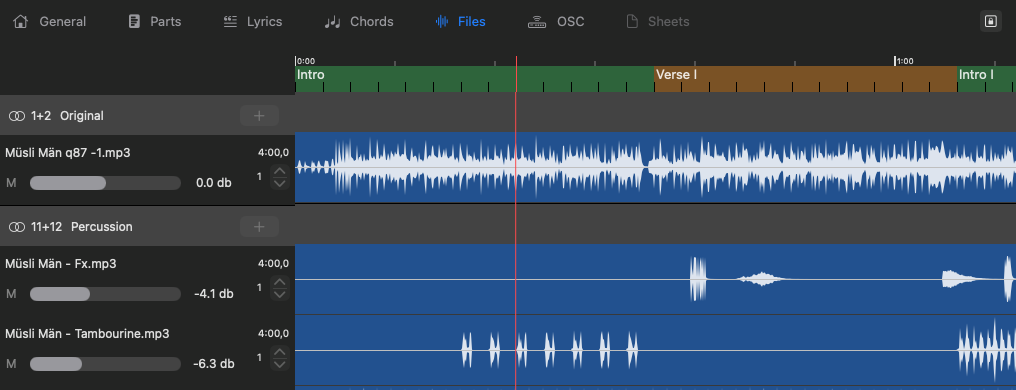
There is a section for each bus you have defined in your project and it lists the files that will play on that bus. There is no limmit for the number of files per bus, but keep in mind that they need to be loaded in to memory.
To add a file click the "+" button to open a file picker dialog that let's you import one or more files into the bus. Files are copied (not moved) into the project directory. If a file with the same name already exists in the song the name will be made unique.
Every file has a header with a mute button, volume slider and a stepper to move the file to the right by a number of bars.
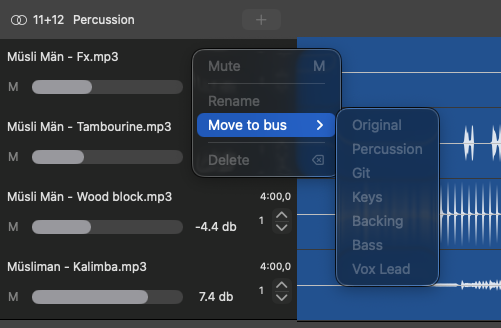
A context menu opens when you right-click the header of a file. It let you mute, delete or rename the file or move it to a different bus.